Setting up professional invoice templates in dotBizX.Com is essential for creating a consistent and trustworthy billing process. With dotBizX.Com, you can easily create invoice and quotation templates using ready-made designs or build custom templates from scratch to match your brand identity. In this guide, you will learn how to set up invoice templates effectively, helping your business generate clear, professional invoices and quotations while improving efficiency and brand consistency.
1. How to show list of invoice templates?
You click on Invoice Templates (1) menu => Now, you can see the interface like Illustration 01 bellows:
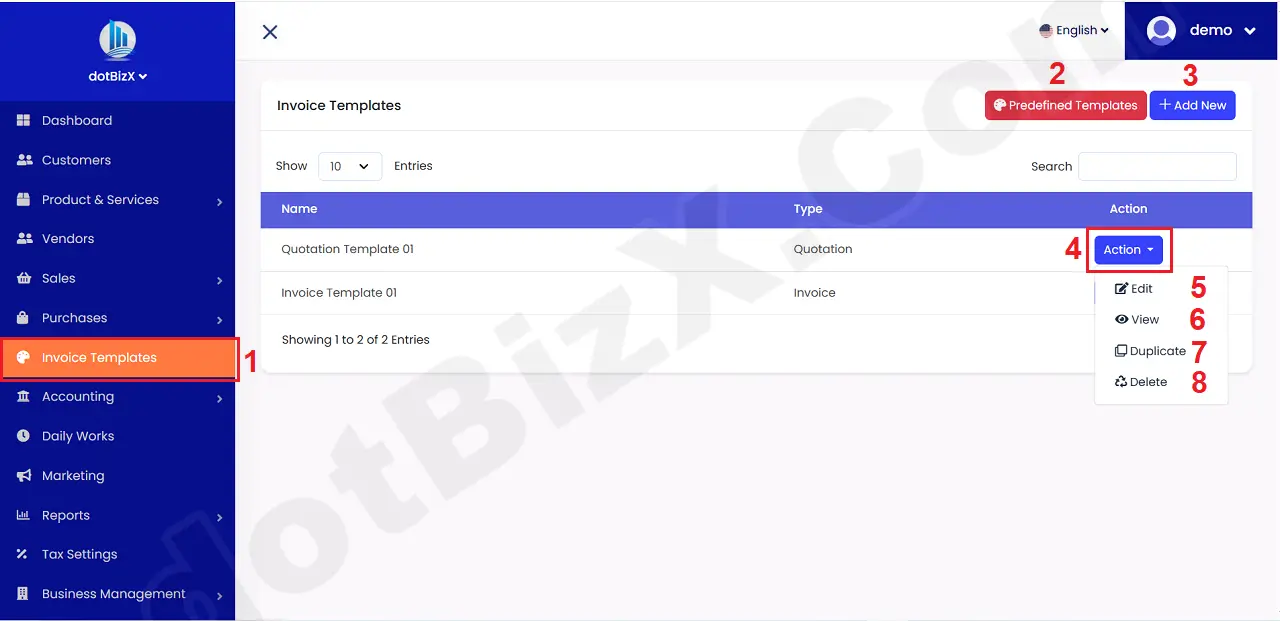
Illustration 01: List of Invoice Templates
* Notes:
+ Predefined Templates (2) button: It's used create Invoice Templates from the existing invoice templates.
+ Add New (3) button: It's used to create new invoice template.
+ Action (4) button: Click on this button to show list of action for the suitable invoice template.
+ Edit (5) option: It's used to modify an existing invoice template.
+ View (6) option: It's used to show an existing invoice template.
+ Duplicate (7) option: It's used to duplicate an invoice template from an existing invoice template.
+ Delete (7) option: It's used to delete an existing invoice template.
2. How to create an invoice/quote template from predefined invoice/quote templates?
To do it, you click on Predefined Templates (3) button => then you see list of predefined templates like Illustration 02 bellows.
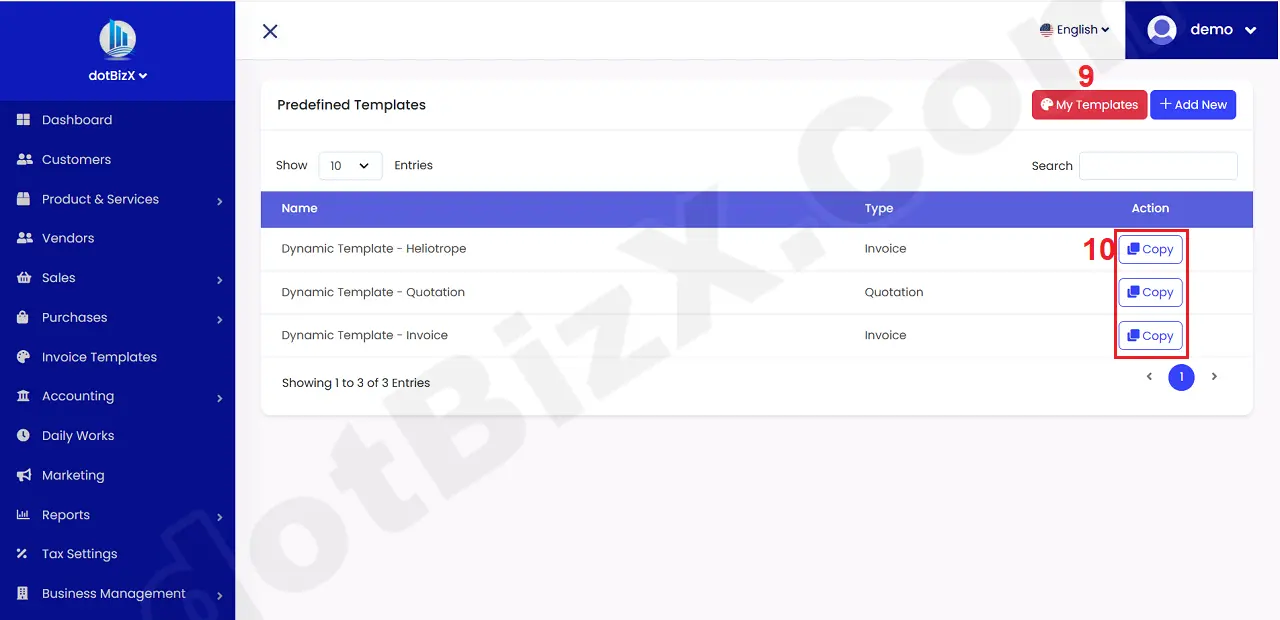
Illustration 02: List of Predefined Templates
* Notes:
+ Copy (10) button: Click it to duplicate that predefined template to new invoice templates.
+ My Templates (9) button: Click it to see List of Invoice/Quote Templates that you had created.
Next, you click on Copy (10) button that's suitable with predefined template to create a new Invoice/Quote template => Then you can see the interface like Illustration 03 bellows.
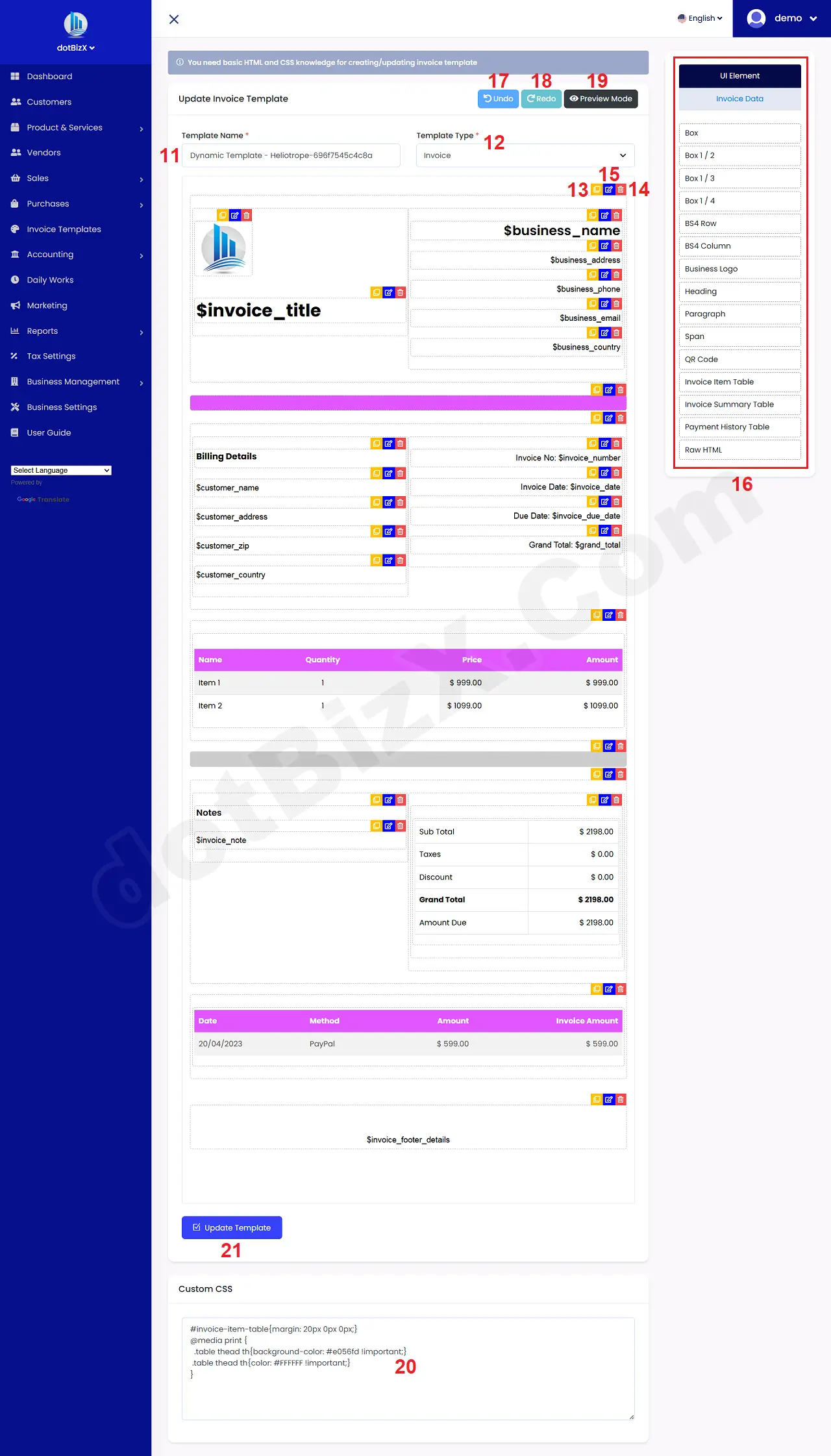
Illustration 03: Invoice/Quote Template Design Interface using Pre-made Templates
In this window, you need:
+ Change Template Name (11) to Your Invoice/Quote Template Name. For example: Invoice Template 01.
+ Template Type (12): Invoice - If you want to use this template for Invoice. Quote - If you want to use this template for Quote.
=> Final, you click on Update Template (21) button to finish.
* Notes:
+ Duplicate Icon (13): Click on this icon to duplicate that element to new element.
+ Pencil icon (14): Click on this icon to modify the element.
+ Trash icon (15): Click on this icon to delete the element.
+ 16th area: You can plug and play element in this area to center area to design for Invoice/Quote template.
+ Undo (17) button: Click on this button to return to the previous action.
+ Redo(18) button: Click on this button to redo the action that was just undone.
+ Preview Mode (19) button: Click on this button to see Invoice/Quote Template.
+ Custom CSS (20) area: If you know about CSS, HTML so you can input CSS command here for Invoice/Quote Template.
3. How to design an invoice/quote template manually?
In list of invoice templates window like Illustration 01 above, you click on ADD NEW (3) button to design an invoice/quote template manually.
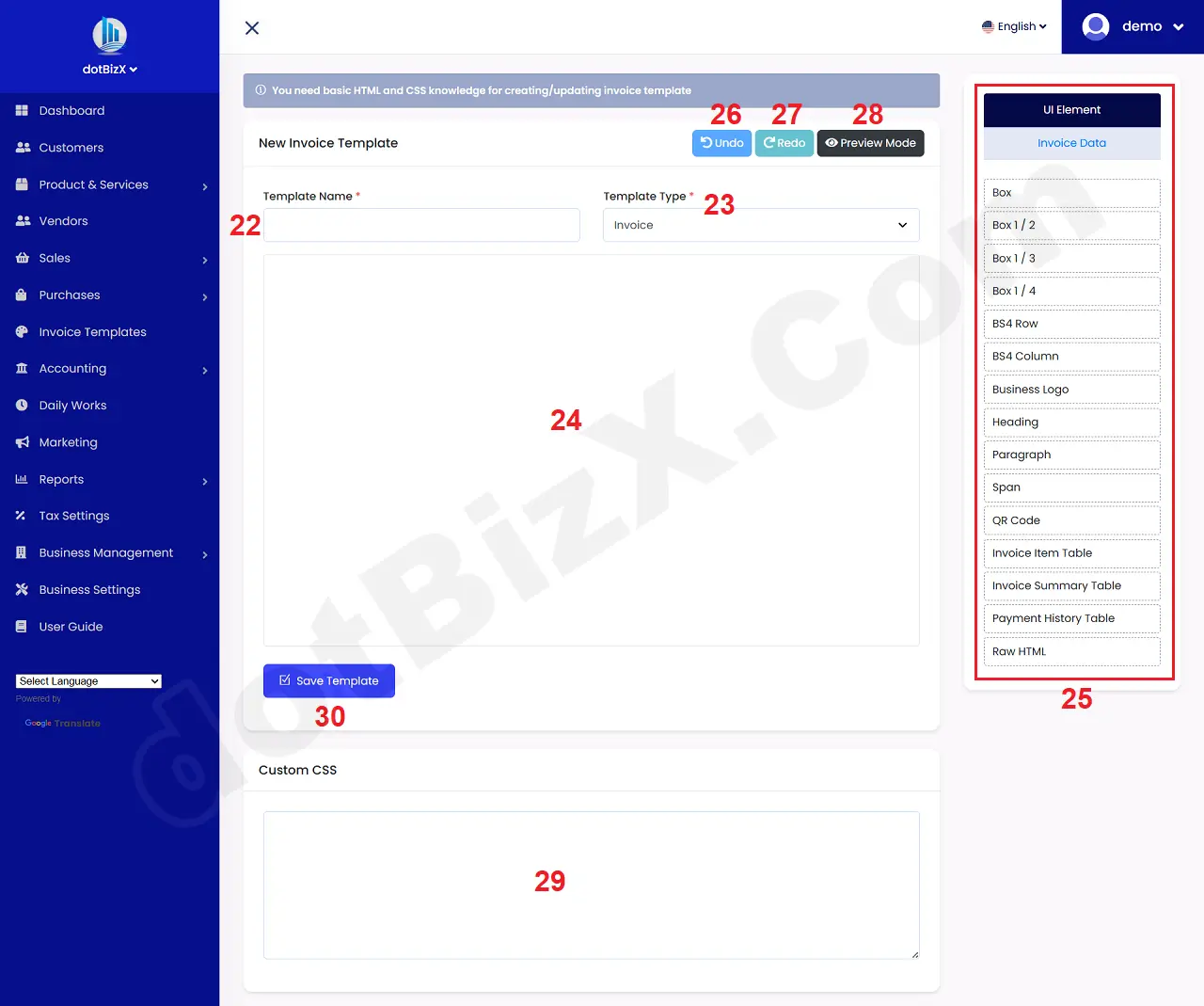
Illustration 04: Design an invoice/quote template manually
Next, you input invoice/quote template name at Template Name (22) box => In Template Type (23) box, you choose the suitable value.
Next, press and hold the appropriate element from 25th area, then drop it into 24th area to add the element to the Invoice/Quote template.
=> Final, you click on Save Template (30) button to finish.
Conclusion
Setting up invoice templates in dotBizX.com gives businesses full control over how they present pricing, billing, and brand identity to customers. Whether you choose to use ready-made invoice and quotation templates or design your own template from scratch, dotBizX provides the flexibility and tools needed to create professional, accurate, and consistent documents.
By customizing invoice layouts, logos, colors, and content, businesses can streamline their billing process, reduce manual errors, and enhance customer trust. More importantly, having standardized invoice and quotation templates helps improve operational efficiency and ensures every transaction reflects a professional brand image.
If you’re looking for a smart, scalable solution to create invoices and quotations that grow with your business, dotBizX.com is the ideal platform to get started—simple to use, highly customizable, and built for modern businesses.