
1. How to show list of bank & cash accounts?
To show list of bank & cash accounts, you click on Accounting (1) menu => next you click on Bank & Cash Accounts (2) option like Illustration 01 bellows.
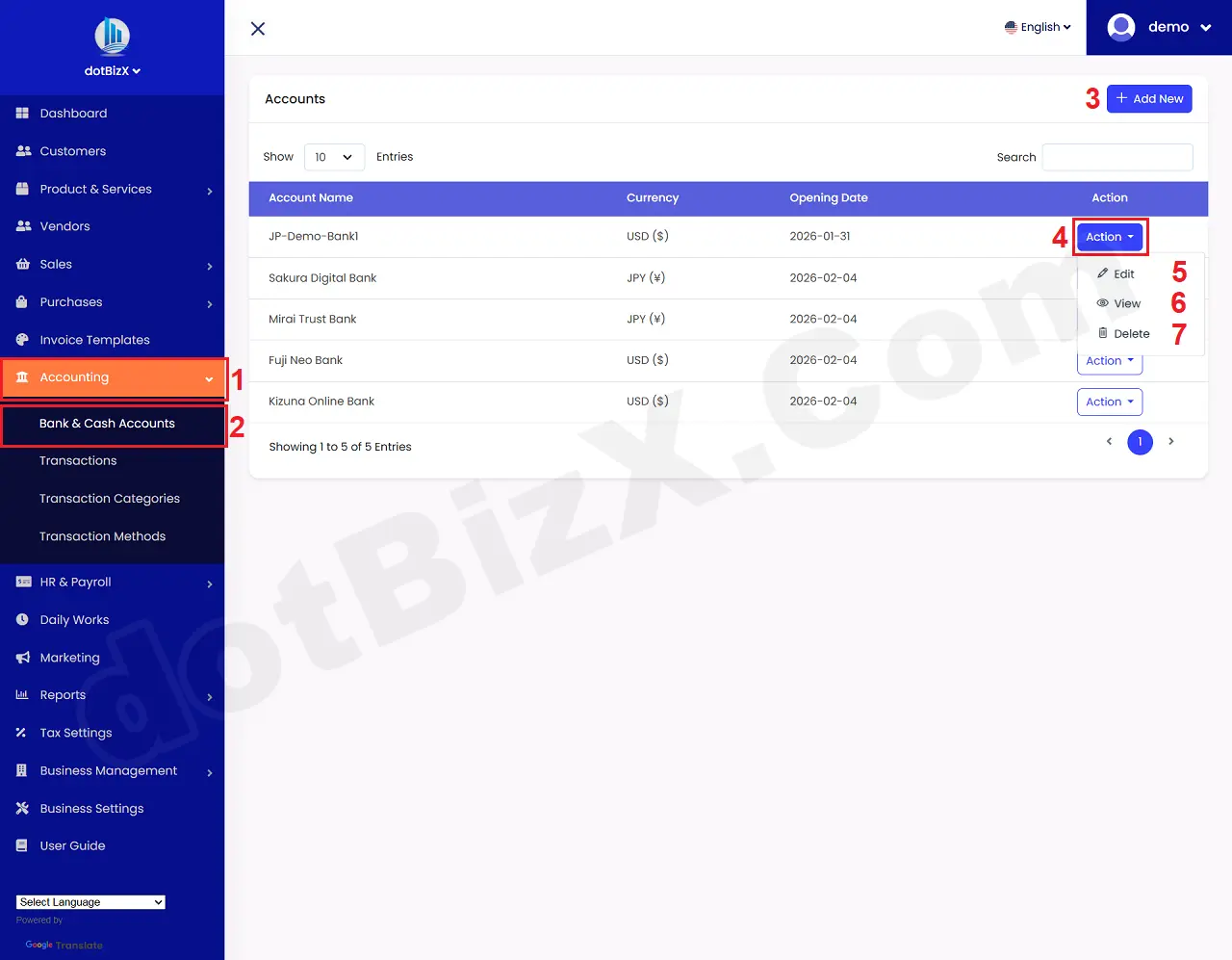
Illustration 01: List of Bank & Cash Accounts
* Notes:
+ Add New (3) button: It's used to create a new Account.
+ Action (4) button: When you click on this button so you can see 5th - 7th options.
+ Edit (5) option: It's used to modify an existing Account.
+ View (6) option: It's used to show an existing Account.
+ Delete (7) option: It's used to delete an existing Account.
2. How to add new account?
To do it, in list of bank & cash accounts like Illustration 01 above, you click on Add New (3) button => in Add New Account Form, you need input all things for your account => Final, you click on Save Changes (14) button to finish.
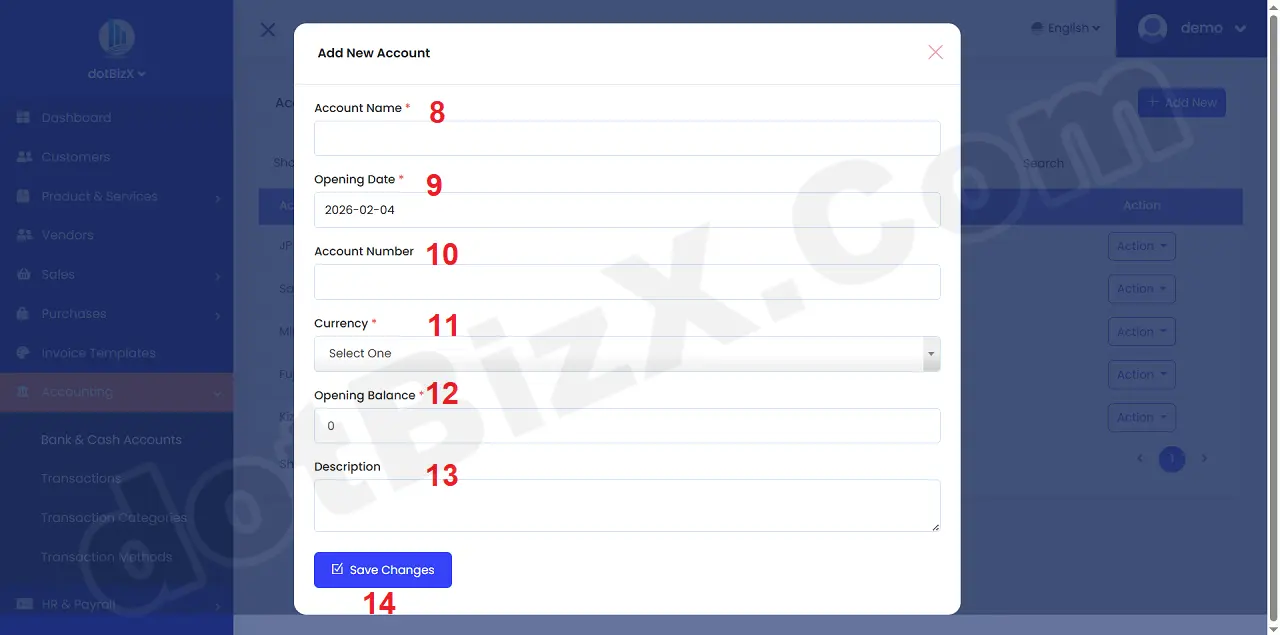
Illustration 02: Add New Account
3. Notes about Bank & Cash Accounts
3.1. What are Bank & Cash Accounts used for?
👉 This is where all of a company's "wallets" are registered and managed within the accounting system.
Including:
🏦 Bank accounts (Vietnam, international, demo, USD/JPY/VND…).
💵 Cash on hand.
💳 Payment gateway (virtual wallet, temporary account).
3.2. In practice, this module has 5 main roles:
3.2.1. It serves as the “source of funds” for all accounting transactions.
All transactions involving money must go through Bank & Cash Accounts, for example:
+ Collecting payments from customers.
+ Paying suppliers.
+ Operating expenses.
+ Transferring funds internally between accounts.
➡️ Without a Bank Account → no cash transactions can be recorded.
3.2.2. Direct Link to Sales, Purchases & Invoices
When you:
+ Collect payment from an invoice.
+ Pay for purchases/vendors.
+ Record a payment/receipt.
👉 The system will ask: Which account is the money going to/receiving from?
→ This refers to the accounts in Bank & Cash Accounts.
3.2.3. Track balances by account (real-time)
Each account will have:
+ Beginning balance.
+ Increases/decreases.
+ Current balance.
💡 Very important for:
+ Cash flow management.
+ Knowing where the money is.
+ Avoiding discrepancies between accounting and actual cash flow.
3.2.4. Multi-currency management
As shown in the image you sent:
+ USD ($)
+ JPY (¥)
👉 Each bank account is linked to one currency
→ The system will:
+ Automatically convert.
+ Generate accurate reports.
+ Prevent currency mixing.
3.2.5. As a platform for generating financial reports:
From Bank & Cash Accounts, the new system can generate:
💰 Cash Flow Statement.
📊 Bank Balance Report.
📈 Business Health / Financial Health.
Income and Expense Reconciliation
3.3. Quick understanding with real-life examples
Bank & Cash Accounts = a list of all company wallets
+ Wallet A: Your Bank Name (Bank Account).
+ Wallet B: Cash fund.
+ Wallet C: USD account.
+ Wallet D: System test demo account.
Each time money moves, you just need to say:
👉 "Which wallet did the money go from to which wallet?".
3.4. With dotBizX, you can:
Create separate bank accounts for each branch
Separate:
+ Cash collection account.
+ Expense account.
Create intermediary accounts for payment gateways.
Use a demo bank to test accounting flow without affecting real data.